Learn to Read: Kids Games
- 4.6
- Rating
- 10.00M
- Installs
- Free
- Price
 Analysis by App-foxy
Learning to read is a big step, but it can also feel like work when a child is still trying to connect letters, sounds, and meaning. Learn to Read: Kids Games takes a playful route through that early stage, focusing on sight words, sentence building, and basic English reading. I found it most useful as a short, guided activity rather than something a child should use for long, unsupervised sessions.
The game comes from RV AppStudios and sits in the educational category. It is free to use, rated for Everyone, and currently listed as version 1.5.1 for devices running Android 6.0 or later. Its average score is 4.6 from roughly eleven thousand ratings, while more than five million installations show that it has reached a large audience of families looking for an accessible reading activity.
How the current version feels in everyday use
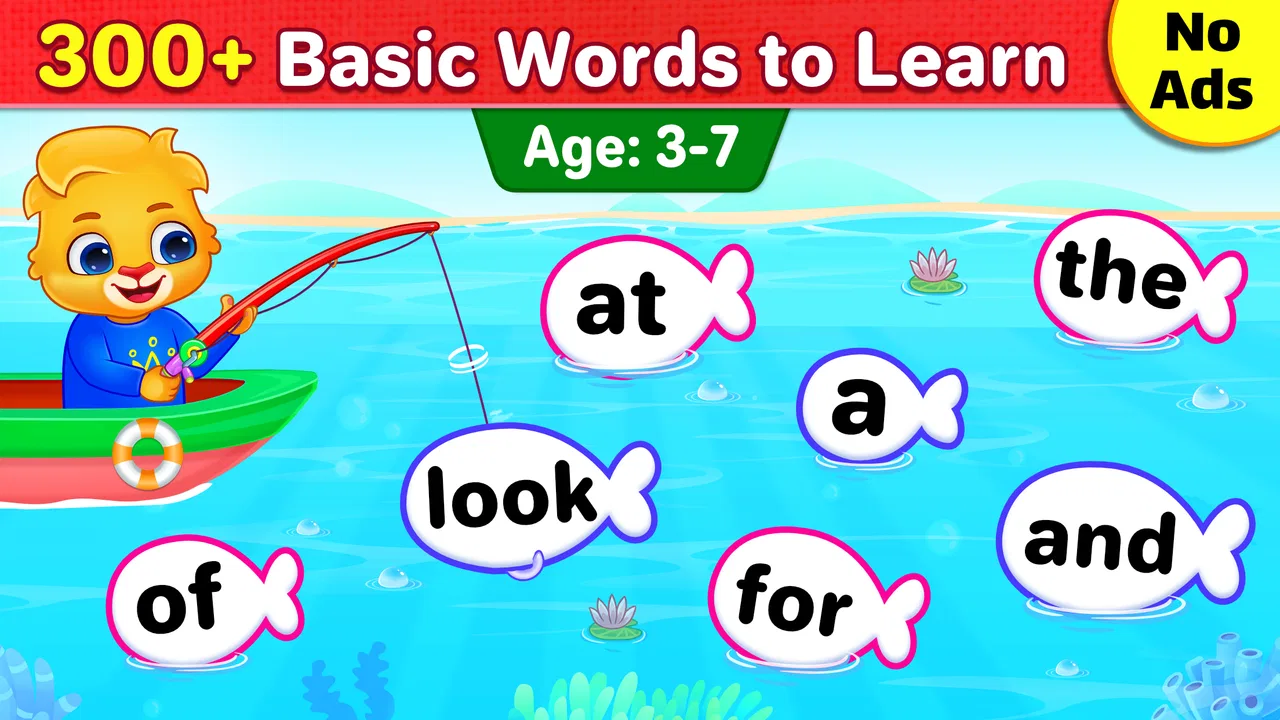
The central idea is straightforward: children practice familiar words, arrange language into sentences, and gradually become more comfortable with English reading. That focus matters because early readers often need repetition, but repetition becomes much easier to accept when it is presented as a game with simple goals and immediate interaction.
You May Also Like

 Blood Strike: 2.5 Anniversary
Blood Strike’s Loadouts Turn Every Drop Into a Tactical Gamble
A close look at Blood Strike’s custom loadouts: how fast access to signature weapons reshapes its battle royale rhythm, rewards preparation, and narrows the gap between fights.

 Pandora - Music & Podcasts
Pandora’s Music Is Easy to Start, but Harder to Recover
Pandora’s strength is its low-effort path from a seed to a station. Its weak spot is how much confidence it asks you to place in connection, setup, and quiet recovery.

 8 Ball Pool
 Is Built on Rivalries, Rematches, and Routine
A close look at the rivalries, rematches, shared routines, and unanswered safety questions that turn a quick pool match into a persistent mobile community.

 Samsung Music
’s Quiet Strength Is Playing What You Already Own
Its reach comes less from spectacle than from dependable access to a personal library. That simplicity is both the app’s strongest retention engine and its ceiling.

 AccuWeather: Weather Radar
AccuWeather Review: A Quick, Clear Forecast for Everyday Decisions
For everyday plans, the best forecast is the one you can understand quickly. AccuWeather makes rain timing, radar, and local conditions easy to act on, with a few trade-offs.

 Hill Climb Racing
Why Hill Climb Racing Still Turns Crashes Into One More Run
A tiny car, a bumpy hill and one more upgrade: Hill Climb Racing keeps resurfacing because its simple chaos makes every near-miss feel personal.
More From Our News Desk



In my experience, the best way to use it is in small sessions. A child can open the game during a quiet moment, complete a few activities, and stop before the practice becomes tiring. That makes it a practical choice for a parent who wants something more focused than a general game but less formal than a workbook.
The activities are aimed at foundational skills rather than advanced reading. Children who are just beginning to recognize common English words may get the most value from it. The game can also work as reinforcement after a child has encountered the same words at school or at home, because seeing a word repeatedly in different contexts can help it become familiar.
One realistic use case is a short after-school routine. A parent might let a child play for a few minutes while preparing dinner, then ask the child to read one of the completed sentences aloud. That second step is important: the game can provide practice, but a brief conversation with an adult helps connect the on-screen activity to real reading.
What the learning flow does well
The strongest part of the experience is its narrow purpose. Instead of trying to teach every aspect of language at once, it concentrates on words and simple sentence construction. That can reduce the feeling of overload for a beginner who is not ready for long passages or complicated instructions.
Sentence activities are especially useful because they move beyond isolated word recognition. A child may know several individual words but still struggle to understand how they work together. Rearranging or completing a sentence encourages attention to order and meaning, not just memorization.
I also like the possibility of using the game as a conversation starter. After a round, an adult can ask the child to find the same word in a picture book, say another sentence using it, or explain what the sentence means. This turns a short screen activity into a bridge toward offline reading, which is a better long-term habit than treating the app as the entire lesson.
Another useful approach is to let the child repeat an activity only when the repetition still feels comfortable. Early reading depends on practice, but forcing a child through the same exercise after attention has disappeared can create resistance. The game is better used as one part of a routine, alongside read-aloud time, letter practice, and ordinary conversation.
Where it fits among other reading options
Compared with a traditional worksheet, this game offers more immediate interaction and may feel less intimidating to a child who dislikes written exercises. Compared with a storybook, however, it is narrower. A book gives richer vocabulary, longer context, imagination, and the chance to follow a complete narrative. This game is better at targeted repetition than at developing reading stamina or deep comprehension.
It also differs from a full phonics program. Sight-word practice helps children recognize common words quickly, but it does not replace learning letter sounds and decoding strategies. If a child regularly guesses at unfamiliar words, struggles with basic sound patterns, or needs systematic phonics instruction, a dedicated phonics resource or teacher-led approach may be a better primary tool.
That distinction is important when deciding whether to install it. I would recommend it as a supplement for early learners who need extra exposure to common English words. I would not rely on it alone for a complete reading curriculum, particularly when a child needs structured progression, detailed feedback, or support for a specific learning difficulty.
Changes, maturity, and what the version tells me
The game was released on February 21, 2020, and the current listing identifies version 1.5.1. Those details suggest a product that has had time to settle into its basic role rather than a brand-new experiment. For a parent, that can be reassuring: the app’s identity is clear, and its reading-focused purpose has remained easy to understand.
At the same time, a version number by itself does not guarantee that every part of the experience will feel modern on every device. I would treat the current release as a stable reading game for its intended age group, not as evidence that it has the depth or adaptive teaching tools of a large paid learning platform.
For existing users, the practical effect of using the current version is likely to be continuity with the same core learning goals: sight words, sentence work, and English reading. If a child already enjoys the activities, there is little reason to change the routine simply because the app has a newer version number. The more important question is whether the child is still learning from the practice rather than tapping through it automatically.
Parents who have not used it before should pay attention to how their child responds during the first few sessions. Does the child try to read the words, or only look for the quickest way to finish? Does the child understand the completed sentence, or merely recognize a familiar pattern? These observations are more useful than assuming that completion equals mastery.
Small details that improve the learning value
One of my main tips is to pause after a sentence is completed. Ask the child to read it aloud and describe what it means. This simple pause changes the activity from a recognition exercise into a combination of reading and comprehension practice.
A second tip is to keep a nearby book with very short sentences. When the game presents a familiar word, look for that word in the book later. This helps a child understand that words are not only game pieces; they appear in signs, stories, notes, and everyday communication.
A third useful workflow is to use the game before, rather than after, a shared reading session. A few minutes of word practice can make a beginner feel more prepared to encounter those words in a book. If the child becomes frustrated, reverse the order and use the app afterward as a lighter review.
It is also worth watching for guessing. A child may appear quick because the word has been memorized visually, but that does not always mean the child can recognize it in a different sentence or print style. When this happens, I would reduce the pace and ask the child to explain the sentence rather than simply moving to the next activity.
Limitations parents should understand
The biggest limitation is scope. This is an educational game for early English reading, not a complete course in literacy. It does not take the place of regular reading with an adult, phonics instruction, handwriting practice, or broader language development.
Its focus on sight words can be helpful, but sight words are only one part of learning to read. Children also need to understand sounds, word families, punctuation, vocabulary, and meaning. A child who is progressing beyond simple words may eventually find the activities too basic, while a child who needs more explanation may require an adult or a more structured program alongside the game.
Another possible friction point is the dependence on a child’s ability to follow the activity independently. Younger children may need help understanding what to do, reading instructions, or deciding why an answer is correct. That is not a flaw in the reading goal, but it means the game should not automatically be treated as a hands-off babysitter.
The free price makes it easy to try, especially for families who do not want to commit to a subscription. Still, free access alone does not tell me whether it will suit every learning style. Some children respond better to stories, physical letter tiles, songs, or direct teaching. If a child repeatedly avoids this game, switching formats may be more productive than insisting on more screen time.
Who should use it, and who should choose something else
I think it is a good match for preschool and early elementary learners who are beginning to recognize common English words and enjoy short interactive tasks. It can also suit families wanting a simple review activity at home, especially when the child needs encouragement to practice between reading sessions.
It is less suitable as the main resource for an older child who already reads simple books comfortably. It is also not the first choice for a learner who needs a carefully sequenced phonics method, individualized correction, or support from a reading specialist. In those situations, a teacher-guided program will usually offer more useful diagnosis and progression.
Families should also think about language context. Because the activities center on English reading, the game makes the most sense when English is the language the child is learning or practicing. A child learning another language would need a resource designed around that language’s vocabulary and reading patterns.
What I would watch in future use
For a child already using the game, I would watch whether recognition transfers outside the app. Can the child spot the same word in a book, read it aloud without guessing, and understand it in a new sentence? Those signs show whether the practice is becoming useful beyond the screen.
I would also watch for a point where the activities stop presenting enough challenge. If the child completes everything quickly but cannot manage a short book, the next step should be more real reading rather than simply repeating the same game. The app works best as a stepping stone, not a destination.
For a new user, I would begin with short sessions and adult support, then gradually step back if the child demonstrates genuine understanding. That approach answers one of the most practical questions parents have: yes, a child may be able to use it independently, but independence should be earned through comprehension rather than assumed from the simple interface.
Overall, I see this as a friendly, focused tool for practicing early English reading. Its free access, Everyone rating, and clear emphasis on sight words and sentence building make it easy to introduce at home. The most important trade-off is that its simplicity is both its strength and its boundary.
I would recommend it to a family looking for a short daily supplement, especially when paired with books and conversation. I would skip it as a sole reading solution or choose a more specialized alternative when a child needs phonics, advanced comprehension, or individualized instruction. Used with realistic expectations, Learn to Read: Kids Games can make repetition feel approachable while giving parents a useful starting point for deeper reading practice.
FAQs for Learn to Read: Kids Games
01What age group is Learn to Read: Kids Games suitable for?
Learn to Read: Kids Games is designed for children aged 3 to 8 years old. The app features a variety of interactive games and activities tailored to different reading levels, making it an excellent tool for early learners and those developing foundational literacy skills.
02Does the app require an internet connection to function?
Learn to Read: Kids Games primarily operates offline, allowing children to engage with the material anywhere without needing a constant internet connection. However, some features, such as updates or additional content downloads, might require occasional online access.
03Are there in-app purchases or advertisements in Learn to Read: Kids Games?
The app offers a free version with basic features and optional in-app purchases for additional content. While the free version is ad-supported, premium users can enjoy an ad-free experience with access to exclusive games and learning materials.
04Is parental control available within the app?
Yes, Learn to Read: Kids Games includes a robust parental control feature. Parents can monitor their child's progress, set time limits, and adjust difficulty levels to ensure the content is appropriate for their child's age and development stage.
05Can multiple children use the app on the same device?
Learn to Read: Kids Games supports multiple user profiles, making it easy for several children to use the app on a single device. Each profile can be customized, allowing kids to track their individual progress and achievements separately.
Pros
- Engaging mini-games enhance learning.
- Child-friendly interface with bright graphics.
- Adaptive difficulty keeps kids challenged.
- Offline access for learning on the go.
- Parental controls ensure safe usage.
Cons
- Limited content in free version.
- Requires in-app purchases for full access.
- No multilingual support available.
- May not engage older kids.
- Occasional app crashes reported.

Learn to Read: Kids Games
Gallery